easycommerceeasycommerce

Compare with

  • WooCommerce

    WooCommerce

  • SureCart

    SureCart

  • EDD

    Easy Digital Downloads

  • Ecwid

    Ecwid

  • AI

    AI Features

    AI Copy Writer

    Generate instant product descriptions.

    AI Image Generator

    Create high-res. images from simple prompts.

    AI Template Generator

    Build store/product templates in seconds.

    AI Smart Search

    Fast and accurate product search results.

    AI Voice Search

    Let customer shop faster with voice search.

    AI Recommendation

    Increase upsell with suggestions that connects.

  • Features

    Features

    easycommerce
    Abandoned Cart Recovery

    Recover lost sales by re-engaging customers with reminders.

    easycommerce
    Product Management

    Create and control your entire product catalog seamlessly.

    easycommerce
    Order Management

    Receive, track, and manage orders quickly and accurately.

    easycommerce
    Shipping

    Automate the logistics with accurate shipping classes.

    easycommerce
    Taxation

    Simplify tax collection and compliance without the stress.

    easycommerce
    Payment Methods

    Offer your customers diverse and secure payment options.

    easycommerce
    Dashboard

    Brings all your business data together for smarter decisions.

    easycommerce
    Coupon Codes

    Create and manage discount coupons that inspire sales.

    easycommerce
    Personalized Emails

    Engage customers with engaging and impactful email campaigns.

    easycommerce
    Physical & Digital Products

    Sell physical or digital or both at once, with ease.

    easycommerce
    Power of AI

    Smarter selling with built-in AI tools and automation.

    easycommerce
    Drag‑and‑Drop Builder

    Customize your product pages with Gutenberg builder.
  • Addons
  • Help & Support
    • BlogSupport
    • BlogBlog
    • BlogDocs
    • BlogRoadmap
    • BlogChangelog
  • Pricing
  • One-Click Demo
Get Started
‌
‌
‌
‌
‌
‌
‌
‌
‌
‌
‌
‌
‌
‌
easycommerce

EasyCommerce is an AI-powered WordPress Ecommerce Plugin revolutionizing ecommerce store building experience for everyone.

Subscribe for Latest Updates

Quick Links

  • Blog
  • Docs
  • Roadmap
  • Changelog
  • Partners
  • Customer Portal

Comparison

  • WooCommerce
  • SureCart
  • Easy Digital Downloads
  • Ecwid

Company

  • Refund Policy
  • Privacy Policy
  • Become an Affiliate

Copyright © 2025 EasyCommerce. All rights reserved.

Points and Rewards

Rewarding customers with points turns single purchases into repeat business. The EasyCommerce Points and Rewards Addon automatically generates points for every completed order (based on your rules), stores those points in the customer’s profile, and lets shoppers redeem that balance as real money on their next purchase.

It’s an easy way to keep customers coming back and increase lifetime value.
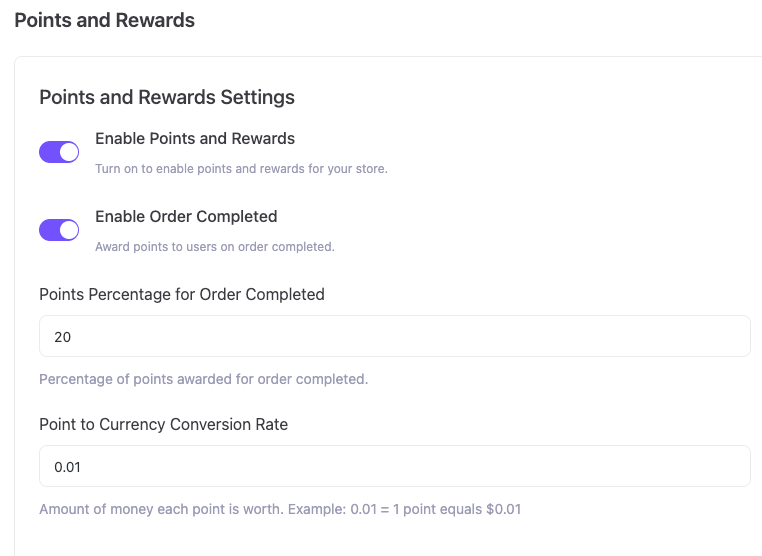
Configure the program right after installation

Points and Rewards configuration

After you install and activate the addon, open the Points and Rewards settings and set these conditions:

  • Enable Points and Rewards - turn the system on for your store.
  • Enable Order Completed - award points automatically when an order is marked completed.
  • Points Percentage for Order Completed - set the percent of the order that converts to points (for example, 20%).
  • Point to Currency Conversion Rate - define how much one point is worth (for example, 0.01 means 1 point = €0.01).

Once you save these settings, the addon will generate points for every purchase using this formula:

  1. Points earned = order total × (points percentage ÷ 100).
  2. Currency value = points earned × conversion rate.

Example (digit-by-digit):

  • Order = €119, Points percentage = 20% --> 119 × 0.20 = 23.8 points.
  • Conversion rate = 0.01 --> 23.8 × 0.01 = €0.238 --> rounded display €0.24.

Points from that purchase are recorded in the customer profile and become redeemable after the order completes.
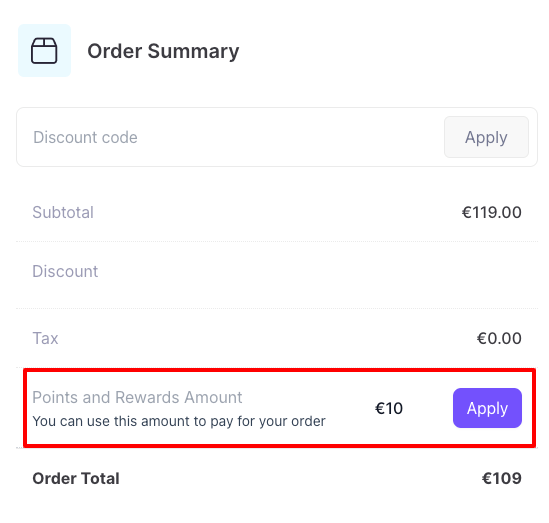
Checkout - Clear amount and precise calculation

Apply in checkout

At checkout, the order summary shows the Points and Rewards Amount. That box -

  • Displays the monetary value of the customer’s existing point balance, which can be applied to reduce the current order total.

This gives customers visibility of both what they can use now and what they will earn next. The store always calculates the values precisely using the settings above, then displays the final, rounded currency amount in the order summary.
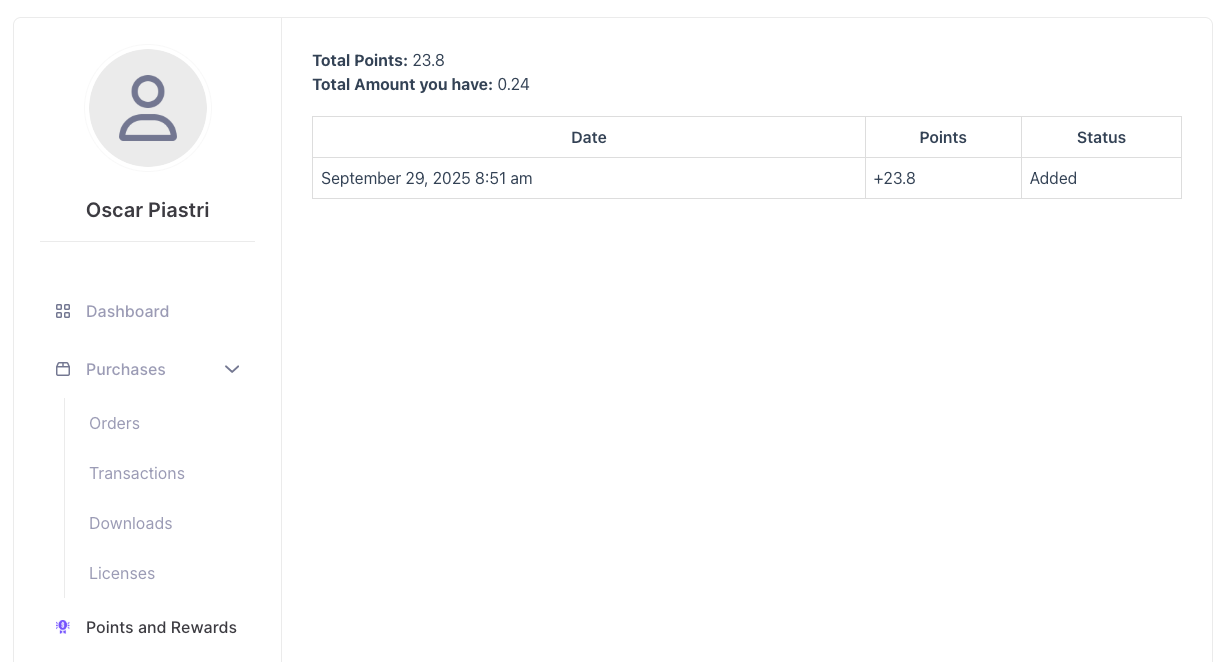
Points and Rewards tab in the customer dashboard

Points stored in customer dashboard

Every customer gets a dedicated Points and Rewards tab in their account. From there, they can:

  • See total points balance.
  • View the currency equivalent of their points.
  • Check a complete history with date, points added/used, and status (added, redeemed, etc.).
  • Redeem their stored points as real money on their next purchase.

All points are saved in the customer profile. That makes redemptions transparent and easy as customers know exactly what they have and can plan their next purchase around usable rewards.

With this setup, EasyCommerce handles the math and record-keeping automatically. You set the rules once; the addon generates, stores, and applies point values so customers get real-money rewards that encourage repeat buying.

Check out our full installation guide with screenshots to set it up step by step in minutes.


Get 'Points and Rewards'

This is a free addon. You can download it immediately for free. No registration or credit card required.

Product Details

  • Version0.9
  • Last Updated2025-09-29
  • WordPress Version6.8 or higher
  • Testes Up ToWordPress 6.8
  • PHP Version7.4 or higher
  • Setup & Docs