easycommerceeasycommerce

Compare with

  • WooCommerce

    WooCommerce

  • SureCart

    SureCart

  • EDD

    Easy Digital Downloads

  • Ecwid

    Ecwid

  • AI

    AI Features

    AI Copy Writer

    Generate instant product descriptions.

    AI Image Generator

    Create high-res. images from simple prompts.

    AI Template Generator

    Build store/product templates in seconds.

    AI Smart Search

    Fast and accurate product search results.

    AI Voice Search

    Let customer shop faster with voice search.

    AI Recommendation

    Increase upsell with suggestions that connects.

  • Features

    Features

    easycommerce
    Abandoned Cart Recovery

    Recover lost sales by re-engaging customers with reminders.

    easycommerce
    Product Management

    Create and control your entire product catalog seamlessly.

    easycommerce
    Order Management

    Receive, track, and manage orders quickly and accurately.

    easycommerce
    Shipping

    Automate the logistics with accurate shipping classes.

    easycommerce
    Taxation

    Simplify tax collection and compliance without the stress.

    easycommerce
    Payment Methods

    Offer your customers diverse and secure payment options.

    easycommerce
    Dashboard

    Brings all your business data together for smarter decisions.

    easycommerce
    Coupon Codes

    Create and manage discount coupons that inspire sales.

    easycommerce
    Personalized Emails

    Engage customers with engaging and impactful email campaigns.

    easycommerce
    Physical & Digital Products

    Sell physical or digital or both at once, with ease.

    easycommerce
    Power of AI

    Smarter selling with built-in AI tools and automation.

    easycommerce
    Drag‑and‑Drop Builder

    Customize your product pages with Gutenberg builder.
  • Addons
  • Help & Support
    • BlogSupport
    • BlogBlog
    • BlogDocs
    • BlogRoadmap
    • BlogChangelog
  • Pricing
  • One-Click Demo
Get Started
‌
‌
‌
‌
‌
‌
‌
‌
‌
‌
‌
‌
‌
‌
easycommerce

EasyCommerce is an AI-powered WordPress Ecommerce Plugin revolutionizing ecommerce store building experience for everyone.

Subscribe for Latest Updates

Quick Links

  • Blog
  • Docs
  • Roadmap
  • Changelog
  • Partners
  • Customer Portal

Comparison

  • WooCommerce
  • SureCart
  • Easy Digital Downloads
  • Ecwid

Company

  • Refund Policy
  • Privacy Policy
  • Become an Affiliate

Copyright © 2025 EasyCommerce. All rights reserved.

Bank Transfer

The Bank Transfer Addon allows you to receive direct payments from your customers through bank transfers. This method is ideal for businesses that prefer manual payment processing or serve customers who do not use digital wallets or online cards.

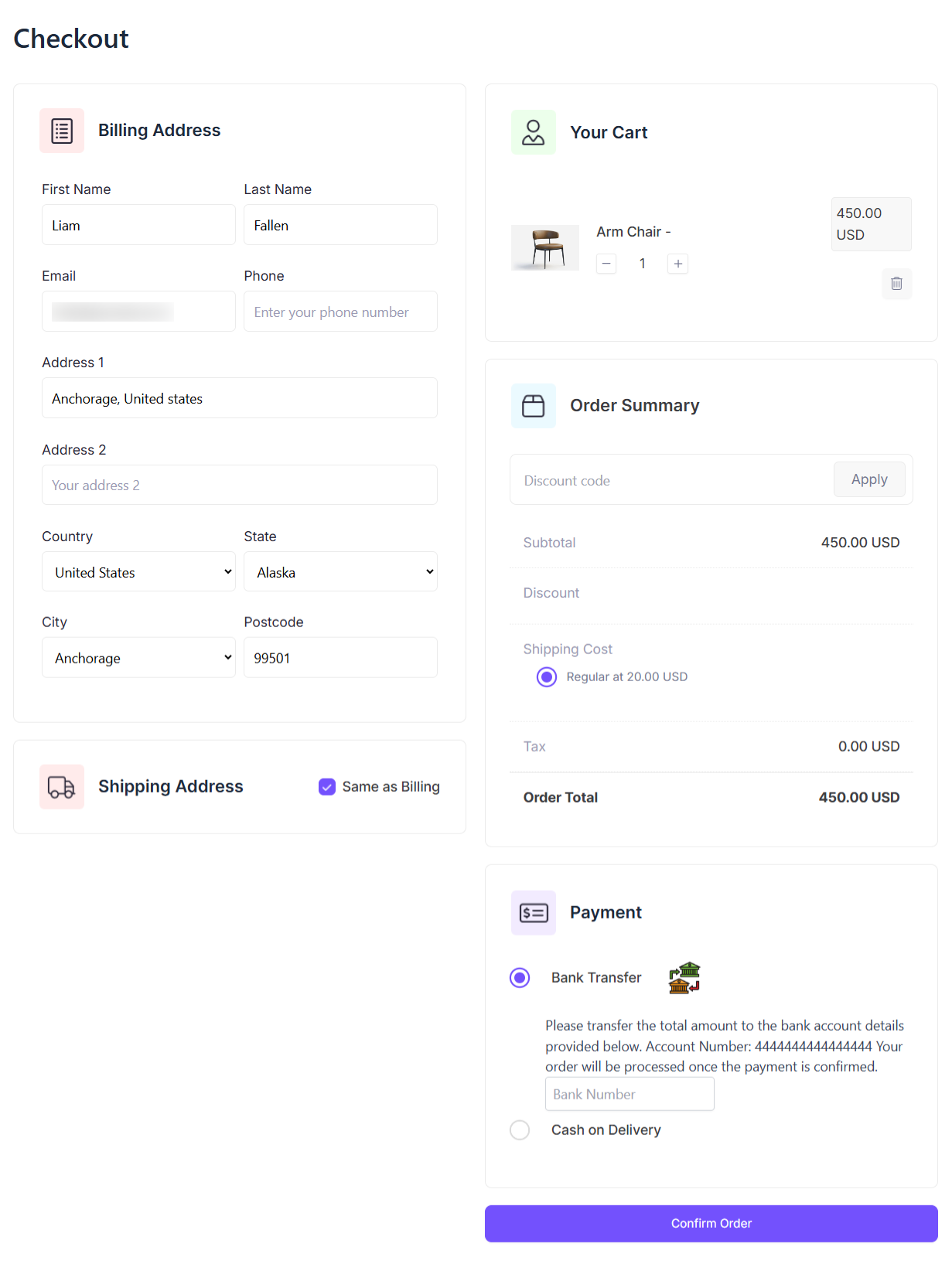
Once enabled, customers can select Bank Transfer at checkout and will be shown your bank account details to complete the payment. They simply transfer the amount and include the reference or order number in the transaction note. After the transfer, you verify the payment manually and update the order status in your store.

Why Choose Bank Transfer Addon?

Give your customers a simple and secure way to pay directly through their bank. It’s perfect for store owners who prefer manual verification and full control over payments.

  • Simple to set up — Just provide your bank account details and payment instructions for checkout.
  • Full manual control — You verify payments before processing orders, reducing fraud and ensuring accuracy.
  • Flexible payment option for customers — Great for offline/legacy banking customers, B2B buyers, or regions with limited card usage.
  • No third-party gateway integration required — This method works without complex APIs or extra merchant accounts.

How It Works (Setup Overview)

1. Go to your WordPress Dashboard → EasyCommerce → Addons → enable Bank Transfer.

 

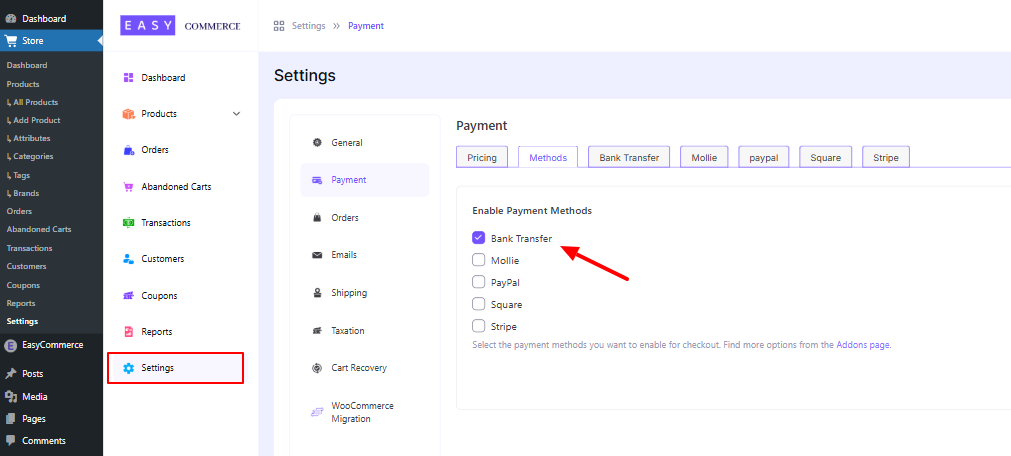
2. In Store → Settings → Payment Methods, turn on the “Bank Transfer” option.
 

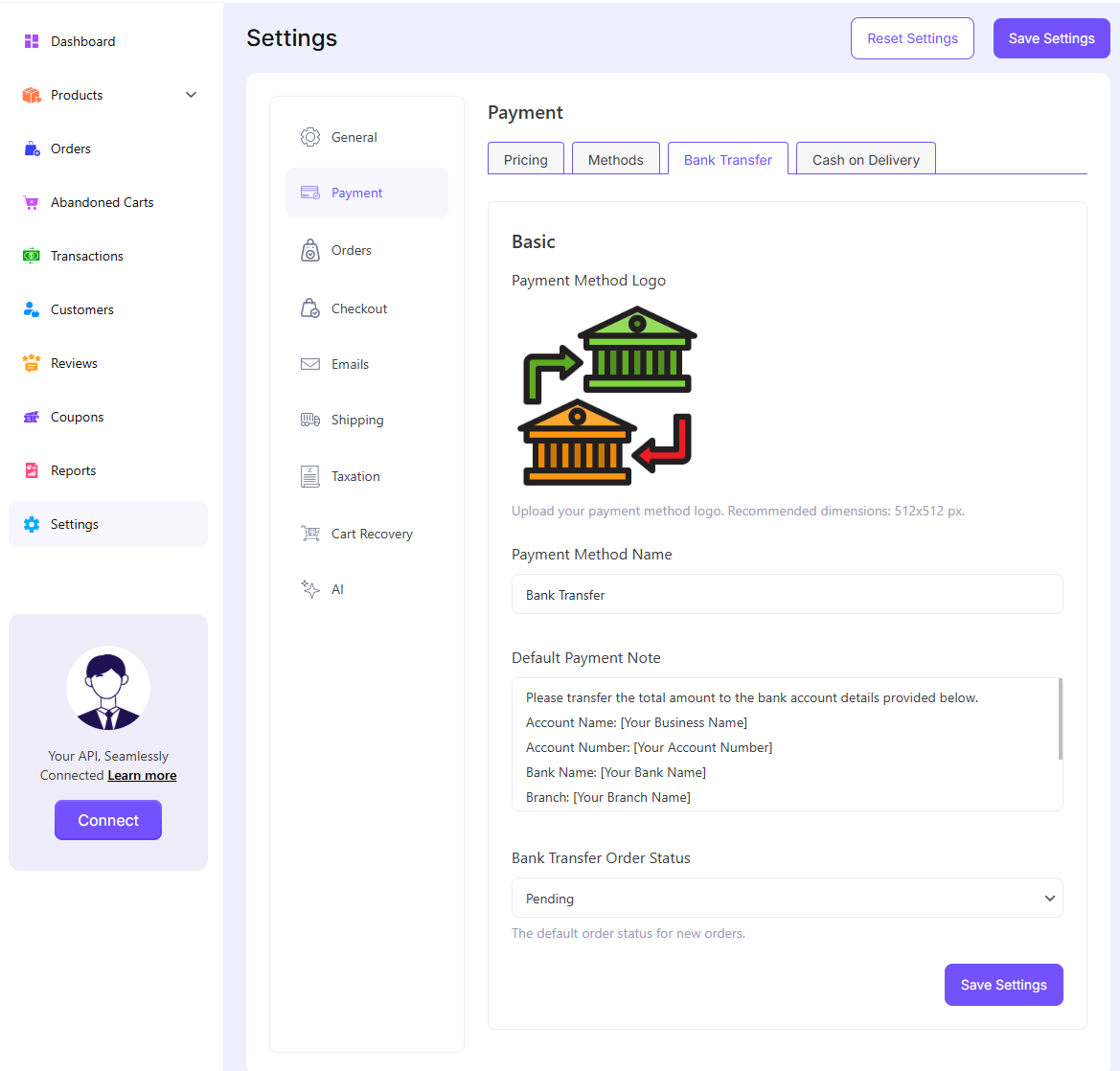
3. In the Bank Transfer tab: upload your logo, set the payment method name, input your bank account, and provide instructions. Choose what order status bank-transfer payments should default to.
 

4. At checkout, your customer selects Bank Transfer and sees your account details with instructions.
5. After the customer has transferred funds, you manually verify the payment in your banking system and update the order status accordingly (e.g., mark as Completed).

Tips for Using Bank Transfer Addon Effectively

  • Always verify deposits in your bank before fulfilling orders.
  • Add a payment note properly so customers know exactly where to send funds. (e.g., account number, IBAN, SWIFT code, bank name)
  • Use the Order Notes section to record payment confirmation dates or reference numbers.
  • Combine with the “Order Notifications” addon (if available) to notify you when a bank transfer order is placed.

Example Payment Note

Please transfer the total amount to the bank account below.

Account Name: [Your Business Name]

Account Number: [Your Account Number]

Bank Name: [Your Bank Name]

Branch: [Your Branch Name]

SWIFT/BIC: [Code if applicable]

Your order will be processed once payment is confirmed.

Include your Order ID in the Order Note for faster verification.

Get 'Bank Transfer'

This is a free addon. You can download it immediately for free. No registration or credit card required.

Product Details

  • Version0.9
  • Last Updated2025-04-21
  • WordPress Version6.0 or higher
  • Testes Up ToWordPress 6.8
  • PHP Version7.4 or higher
  • Setup & Docs